Everything in Finance
✓ Revenue and income tracking
✓ Expenses and budgets
✓ Subscription tracking
✓ Cash reserve and savings goals
✓ Tax set-aside
✓ Reports and export

Available · Finance Department
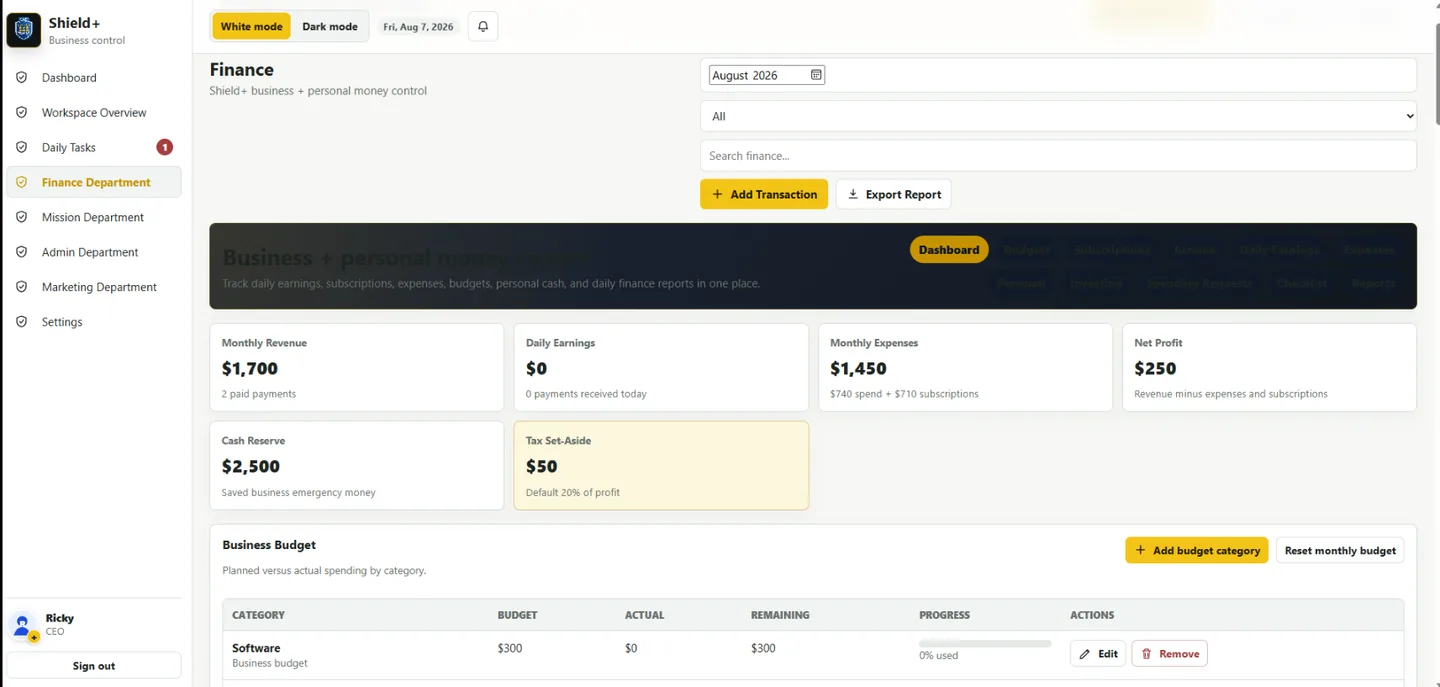
Choose Business Finance or Personal Finance, then control revenue, expenses, daily earnings, budgets, subscriptions, reserves, tax set-aside, goals, and reports.

Real Shield+ workspace
Track the numbers that matter, move between business and personal views, and export reports from a workspace designed for daily decisions.
Guided setup
Select Business Finance or Personal Finance. The labels and recommendations adapt to the way you manage money.
Add currency, monthly income target, tax percentage, reserve target, and starting balance.
Choose budget categories, recurring subscriptions or bills, goals, and report frequency.
One-on-one Shield+ guidance is available for account, billing, onboarding, and workspace questions. Call or text 239-821-0684.
Frequently asked questions
Only after Stripe confirms payment through a signed webhook and Shield+ creates the organization entitlement. Reaching a browser success page does not grant access.
Yes. Billing is managed through the Stripe Customer Portal. Access normally continues through the paid period, subject to the subscription policy.
Yes. The workspace includes an Available Departments area. Only purchased and active departments appear in operational navigation.
No. Bank synchronization is not included in this first Finance plan.
Customer Operations, Marketing, Production, and Mission stay connected through the same Shield+ organization.